Products

One project record for the work that has to stand up later.

CMIS connects field reports, RFIs, submittals, payments, photos, working days, and closeout records in a browser-based platform built for public agency construction management.

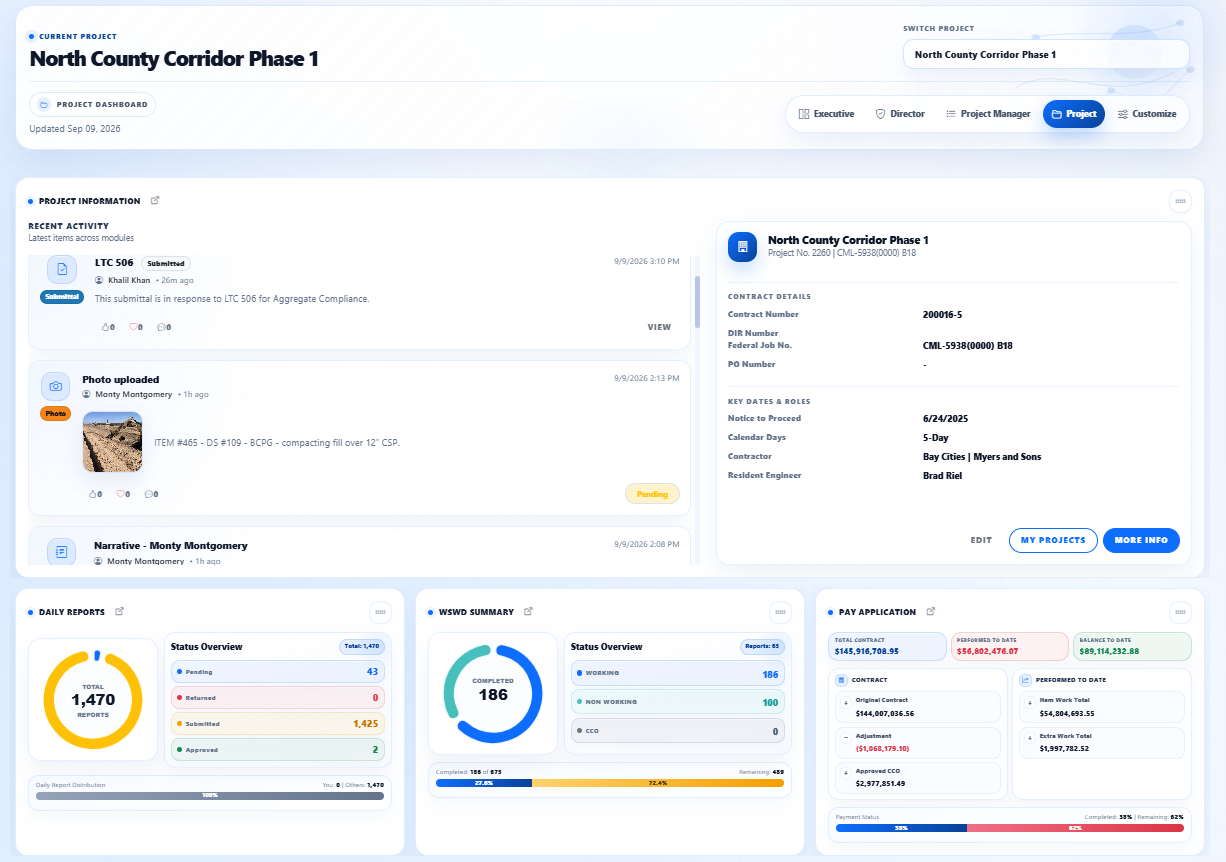
CMIS project dashboard screenshot
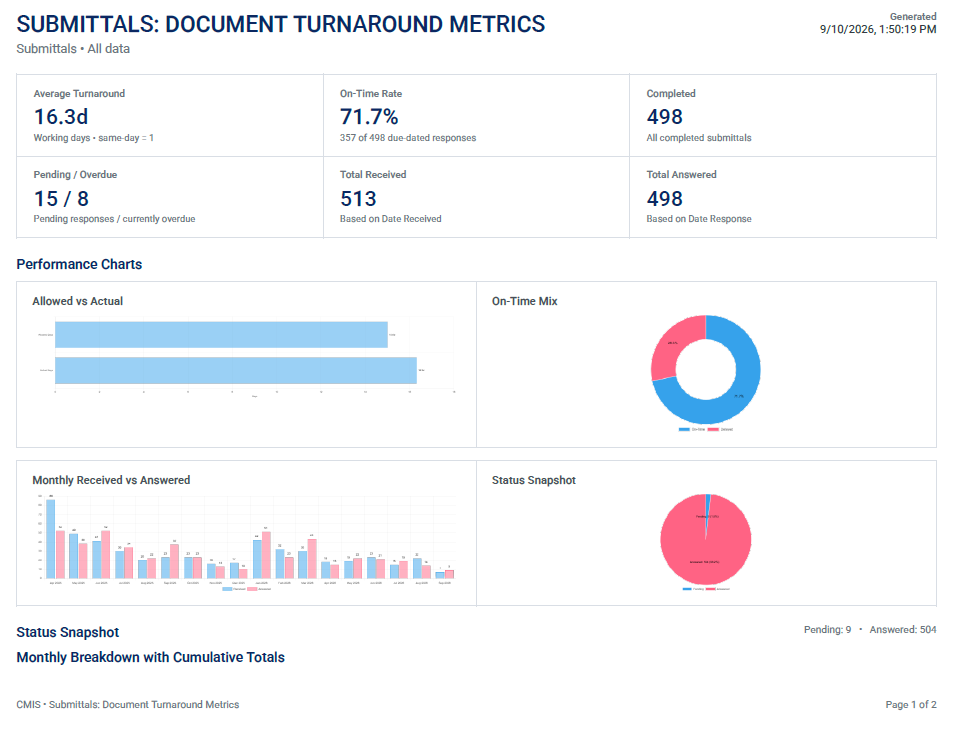
CMIS submittal metrics screenshot
CMIS daily report screenshot

Field records

Mobile-first records from the job site to closeout.

Inspectors can capture daily reports, quantities, photos, punch lists, weather, crews, and narratives in the same record office teams review.

  • Daily reports with work items, labor, equipment, materials, quantities, photos, narratives, and weather.
  • Punch list and field workflow tracking for open and resolved items.
  • Training that uses the agency's live project data instead of a generic demo.
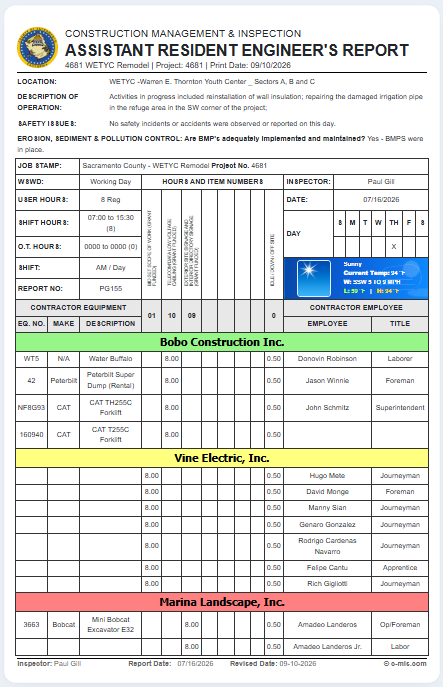
CMIS assistant resident engineer daily report screenshot

Project visibility

A project dashboard that shows what needs attention.

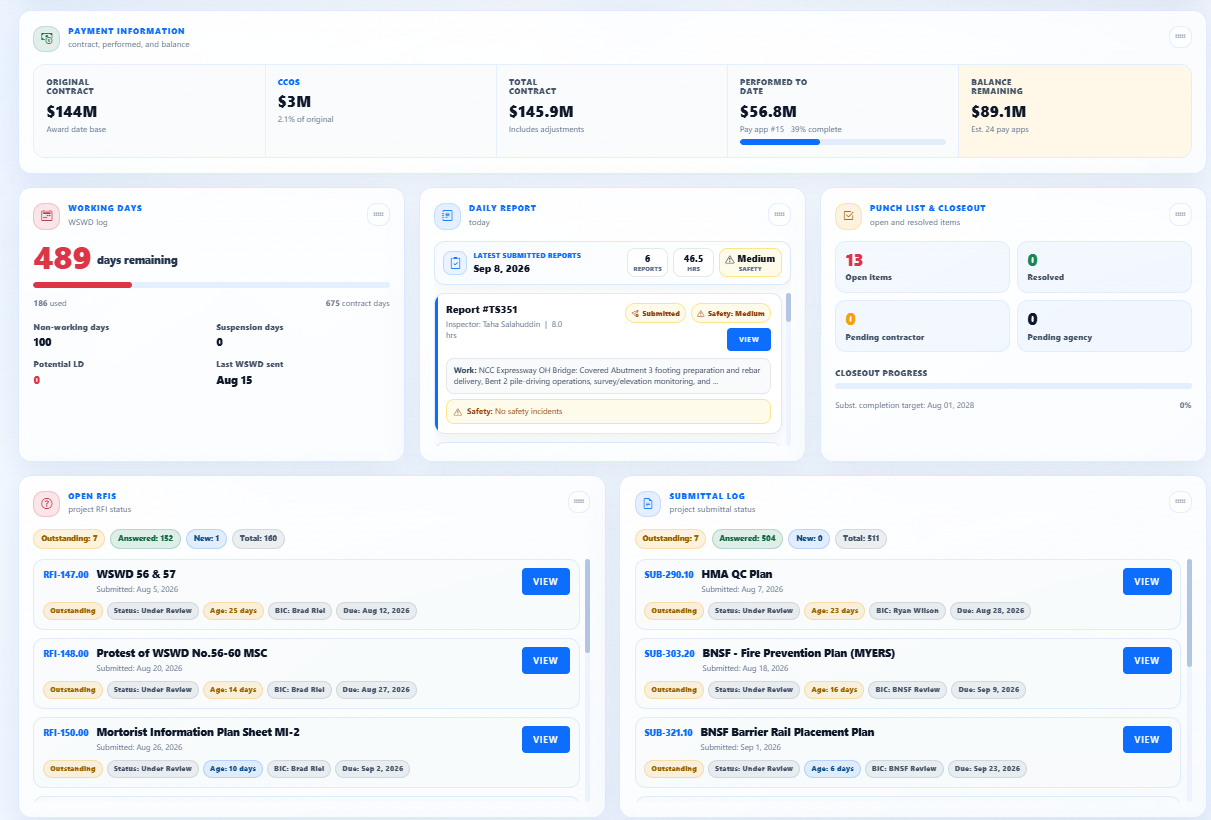
CMIS brings recent activity, project details, daily report status, working days, pay application data, and open review items into one project view.

  • Project-level views for owners, resident engineers, construction managers, inspectors, consultants, and contractors.
  • Role- and project-based access keeps each user focused on the work relevant to them.
  • Dashboards surface open RFIs, submittals, pay applications, working days, and project activity.
CMIS project management dashboard screenshot

Document control

RFIs, submittals, and ball-in-court stay traceable.

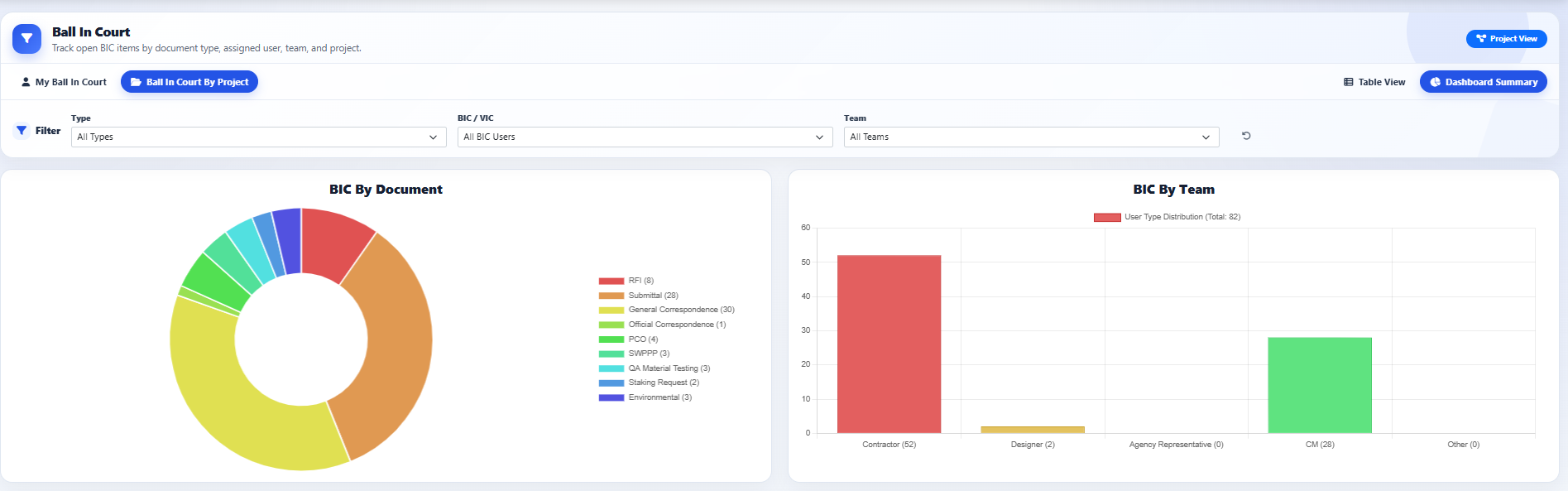
The proposal centers the platform around the records project teams route every day: submittals, RFIs, invoices, change orders, correspondence, and related files.

  • Track open ball-in-court items by document type, assigned user, team, and project.
  • Use in-app PDF markup and publishing during submittal review.
  • See turnaround metrics for submittals and other review workflows.
CMIS ball-in-court dashboard screenshot

Progress payments

Payment support tied to bid items, quantities, and backup.

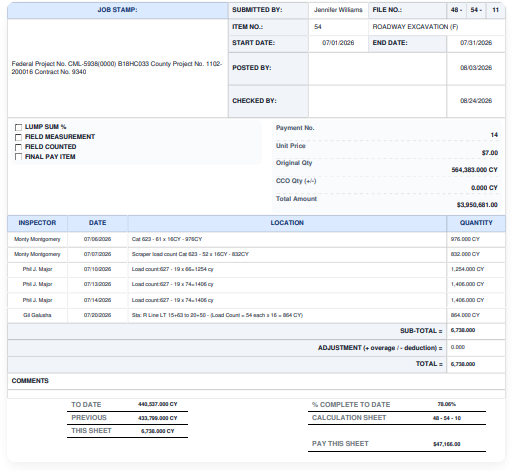
Progress payments and invoices track at both the bid-item and summary level, giving teams clearer support for monthly reviews and retained project records.

  • Review original contract, change order, performed-to-date, and remaining balance data together.
  • Import contractor-submitted quantities directly into pay applications.
  • Connect payment support back to field quantities and project documentation.
CMIS project progress payment screenshot

Photos, video, and maps

Mapped field evidence stays tied to the work.

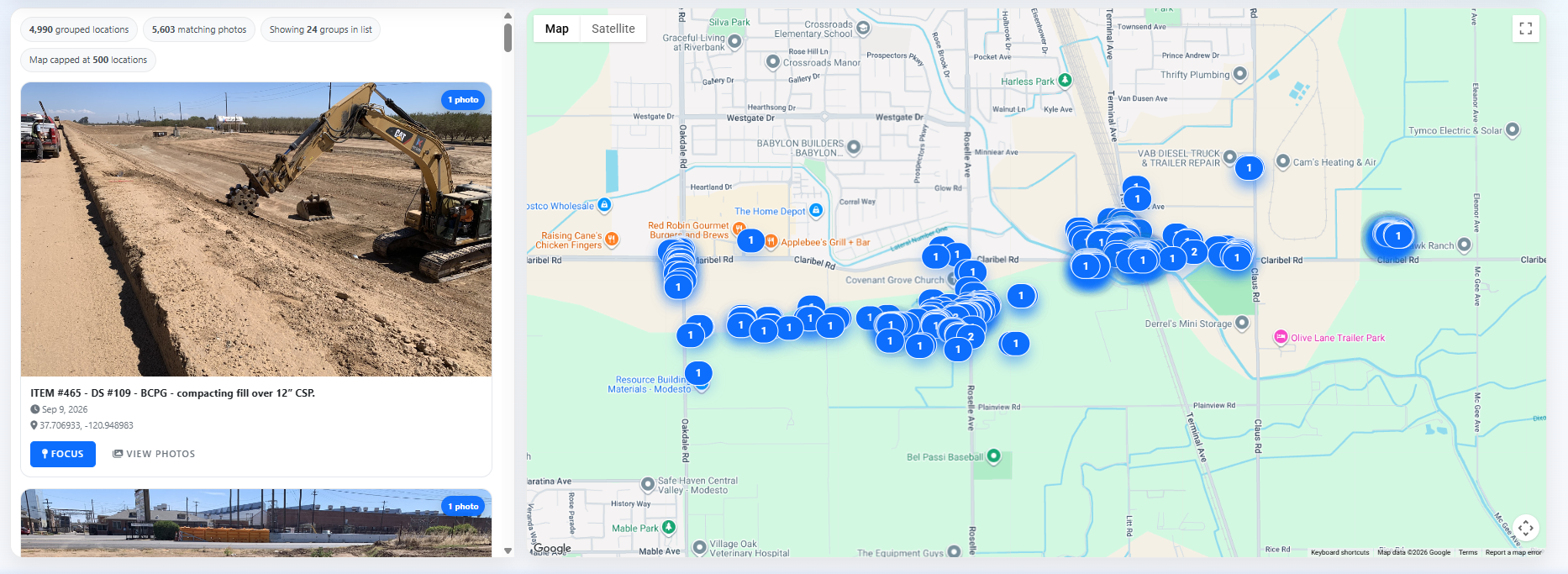
Photos and videos can stay connected to project locations, making the record easier to inspect when a question comes up months later.

  • Review mapped photo groups alongside the field images that support the record.
  • Use GPS-based mapping for field conditions, photos, ADA curb ramps, and non-compliance tracking.
  • Keep location context connected to the project record instead of trapped in separate folders.
CMIS mapped project photos screenshot

Compliance and closeout

Audit-ready records without reconstructing the paper trail.

CMIS supports the documentation requirements of FHWA, FTA, FRA, EPA, and other federal agencies that fund or oversee public infrastructure, while staying useful on projects with no federal funding requirement at all.

  • Core project documentation can export to PDF nightly for a standing archive independent of the platform.
  • Force account tracking breaks out labor, equipment, and COZEEP hours and mileage.
  • Project close-out and archiving are part of the administrator training path.
CMIS submittal document turnaround metrics screenshot

Custom reporting

Custom reports, AI summaries, and official project letters.

CMIS supports custom-built reports for encroachment permits, stormwater reporting, and development project reporting. CMIS Assist can also generate reports from the project data teams are already collecting, including monthly project reports, job status reports, and force account analysis on the fly.

  • Generate specialized report workspaces for encroachment, stormwater, and development project records.
  • Use AI-assisted reporting to produce monthly summaries, job status reports, and force account analysis from collected CMIS data.
  • Submit official custom letters through the General Correspondence module so the communication stays tied to the project record.

Report workspace

Encroachment Permit Inspection Report

Report Date: 08/23/2026 | Project CMIS-DEMO

All saved

Stormwater reporting

Visual Inspection

AI monthly project report

Report Intelligence

Project Management Tools

Every workflow becomes part of one live project record.

CMIS is built around the work public works teams manage every day: document control, inspection reporting, pay applications, meetings, plan sets, working days, safety, agreements, and closeout. Logs build themselves as information comes in, so teams can see the record forming in real time.

Live logs built as RFIs, submittals, correspondence, and changes move. PDF markup for Submittals and RFIs during review. One-push filing for Caltrans 63, LAPM category and other agency standard structures.
CMIS Live Log Document Management

Inspection Reports

Inspection reporting built for public works.

Purpose-built report workspaces keep agency inspection records consistent, searchable, and ready for review.

  • Capital Improvement
  • Development
  • Encroachment Permit
  • RE/PM high level report

Pay Application

Payment support with backup in the same record.

Progress payment workflows connect quantities, backup calculations, contractor requests, and approvals.

  • Backup calculation reports
  • Progress payment
  • Contractor pay request
  • Signature process

Project Files + Plan Room

Project files land in the right structure fast.

Add Caltrans 63 categories, LAPM categories or other agency standard categories with one push of a button, then keep plans, specs, and as-builts connected.

  • Caltrans 63 category filing
  • LAPM category filing
  • Local city, county, state or federal standard categories
  • Project plan set
  • Specifications and project documents
  • As-builts

Meetings + Time

Meeting records and contract time stay visible.

Keep project meetings, construction meetings, working days, and task assignments tied to the project record.

  • Project meetings
  • Construction meetings
  • Weekly statement of working days
  • Task Manager

Field Compliance

Field issues move from observation to closeout.

CMIS tracks field conditions, interviews, safety workflows, notices, and closeout items without splitting the record.

  • Punch List
  • Curb Ramps
  • Employee Interviews
  • Issue Notifications
  • Safety Module

Changes + Agreements

Change support stays defensible.

Agreement, permit, force account, and PDF markup workflows keep review decisions and backup documentation connected.

  • Force Account Analysis
  • Tentative Agreement
  • Permits | Agreements
  • PDF markup for Submittals and RFIs

Document Management

The logs CMIS is known for.

As teams route correspondence, RFIs, submittals, changes, testing, payroll, and environmental records, CMIS builds live logs that stay tied to the source documents, review status, and project history.

General Correspondence RFIs Submittals Field Order Directive Non Conformance Reports Surveying Request Environmental Scheduling PCO | RFP CCOs Extra Work Bill QA Material Testing QC Material Testing SWPPP | WPCP Design Clarification Certified Payroll